Use Zemanta to Blog Smarter
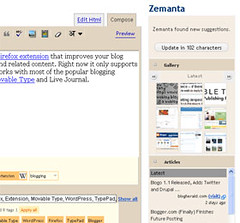 Image by chucks via Flickr
Besides, Zemanta looks for familiar words and phrases in the post and suggests links for them. In Blogger, the links appears at the bottom of the text editor.
You can install Zemanta in several ways. They have got Firefox extension, IE plugin, and bookmarklets. The bookmarklet is of course the most easy and fast to install and use! If you want to try out, head to the Zemanta website and drag the bookmarklet to the bookmarks bar. Now, open the post editor and click the bookmarlet. And voila! All the treasures of the internet are right in front of you to use.
Zamata also works with other blogging platforms like, Wordpress, Live Journal, and the rest.
![Reblog this post [with Zemanta]](http://img.zemanta.com/reblog_e.png?x-id=f2ccc5f1-6f7d-4c90-a0f7-dcfa1ab7231b)


Comments
Post a Comment