Going LCD
 I have just replaced my old CRT monitor with an TFT LCD monitor. It is an LG 17 inch wide model (L177WSB). It costed Rs. 8500/-. The main advantage of LCD monitor is perhaps its low power consumption. Also its wide screen gives lots of workspace.
Its normal resolution is 1440 x 900. All my linux based operating systems (ubuntu, PCLinuxOS) got automatically configured with this resolution. But I think 1280 x 800 is better as you don't have to strain your eyes to read the small letters.
Setting the correct resolution in windows was somewhat, problematic. It was perhaps because of my old graphics card (i810). In the left is Windows xp running at a resolution 1152x968. If you correct aspect ratio (16:10) is not maintained pictures will look widened as is the case with me. Installing the drivers given with the CD does not help much. All resolution options are of dimentions 4:3. Well, it is not a severe problem. The effect is prominent only when you see picture of someone's face!
There is another solution to this problem. Just make the wide screen monitor act like a 4:3 monitor. There is a option in the monitor menu to do this. In that case, on both side of the monitor some blank space will be left unused.
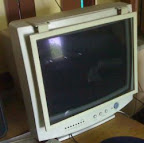 My old CRT monitor was also of LG (14 inch). CRT monitors have become really cheap these days. There are also several advantages of CRT monitors like good contrast, color purity etc. So before buying you should compare the advantages and disadvantages of both type of monitors.


Comments
Post a Comment